IK Pass
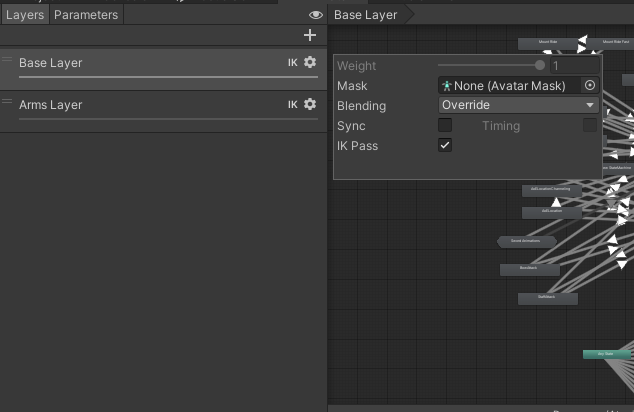
In order for the IK Handler to function you will need to add IK pass to your layers where you need IK Handling. This is a Unity requirement for IK Handling to function.
IK Behaviour
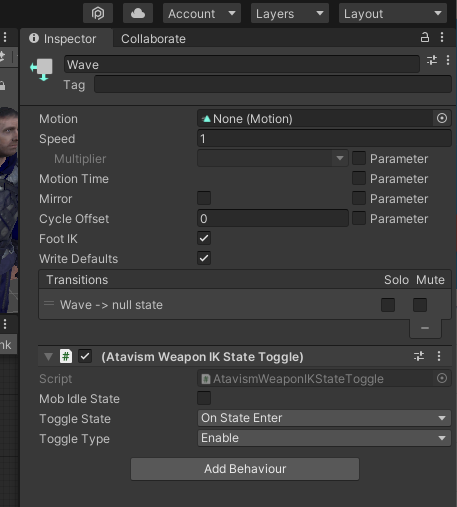
There is a special behaviour that will allow you to toggle the ik handling on and off during runtime. As specific animation sequences are played, the animator will
States
These are the allowable states for the Behaviour. You can choose whether to this will affect this on entering, exiting the animation or anytime it updates. You can also select whether it is the mobs idle state or not.
On State Enter
As the animator enters into this specific animation sequence do the following action (type).
On State Exit
As the animator exits into this specific animation sequence do the following action (type).
On State Update
As the animator updates into this specific animation sequence do the following action (type).
On State Move
As the animator moves into this specific animation sequence do the following action (type).
On State IK
As the animator changes IK in this specific animation sequence do the following action (type).
Types
These are the allowable types for the Behaviour. You can choose whether to enable, disable or toggle the existing setting for this particular behaviour.
Enable
Enable the IK handling when this is triggered.
Disable
Disable the IK handling when this is triggered.
Toggle
Toggle the existing state of the IK handling when this is triggered.
Mounted Enable
Enable the IK handling when this is triggered.
Mounted Disable
Disable the IK handling when this is triggered.
Mounted Toggle
Toggle the existing state of the IK handling when this is triggered.