HNGamers
Expand your Knowledge
  • Courses
  • News
    • Archive posts
  • Pages
    • Support
    • Public Projects
    • About us
    • Become a teacher
    • Term Conditions
    • Privacy Policy
    • Refund and Returns Policy
    • Cookie Policy
  • Shop
    • My account
      • Request Warranty
    • Checkout
    • Cart
  • My Account
  • 0 $0.00 0 items
  • Register

Menu Structure

Posted on October 7, 2022
by thevisad
Course Content
The Plugin
0/8
Get the plugin
Update the Plugin
Menu Structure
Error Messages
MySQL Remote connections
Suggested Atavism Hosting
MySQL User Permissions
Recommended Plugins
Atavism Verify
0/10
Get the plugin
Update the Plugin
Create a Verify Page
Modify your Atavism Server
Wipe your characters – Required
Required Addons
About the Plugin
Known Issues
Configure the Plugin
Verify page does not work – 404 error
Atavism Store Interface
0/11
Update the Plugin
Required Addons
Configure the Plugin
Get the Plugin
Configure WooCommerce Money Purchase
Configure WooCommerce Item
About the Plugin
Configure Database User Permissions
IonCube Loaders – Subfolder Loading
IonCube Loaders – PHP 7.4
IonCube Loaders – PHP 8.1
Atavism User Management
0/4
About the Atavism User Management Plugin
Configure the Atavism User Management Plugin
Update the Atavism User Management Plugin
Managing users with the Atavism User Management Plugin
Atavism WordPress CMS

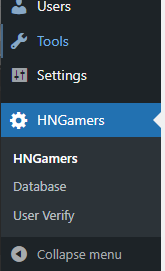
As you add additional plugins to the system, the Admin menu will grow to include each of these plugins. Located near the bottom will an HNGamers menu item, expanding this will show all the plugins currently configured.


Previous
Next
HNGamers | Expand your Knowledge

Register
Lost your password?