Introduction
Atavism provides several blank scenes for you to take and apply your own modifications too. These items, when saved must have the proper names for the game server to load them as desired.
Login
Assets/Dragonsan/Scenes/BlankLogin.unity
Name: Login
Character Selection
Assets/Dragonsan/Scenes/BlankCharacterSelection.unity
Name: CharacterSelection
Main Scene
Assets/Dragonsan/Scenes/BlankAtavismScene.unity
Name: Whatever name you desire for your world.
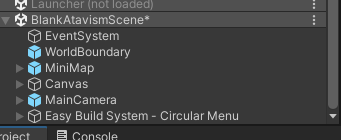
The basic requirements for a scene to function properly are located here. However, this will not provide the player with any functionality and will spawn into mid air, falling until they land on some terrain. You will need to build out an environment for the player to run around in.
Design your Template
Once you have modified the basic scene to your designs, you should save this scene with a new name and in a new path you have created. For our purposes, all of the game examples and items are created in the Assets/HNGamers folder structure for easy identification. We create a new folder for each item type and new item we are working on to ensure we have a clean working environment. Failure to do this early on will quickly lead to overload.